Showing posts with label CCIE R&S Preparation. Show all posts

Wednesday, February 19, 2020

CCIE R&S Lab Equipment

When you are studying for CCIE R&S (or any other track) you will have to spend a lot of time (anything between 600 – 1000 hours) configuring your routers and switches. I get a lot of questions about CCIE lab equipment, things like:
  • What routers or switches should I buy?
  • How many routers or switches do I need?
  • Can I use GNS3 for labs?
  • etc.
To answer all these kind of questions I decided to write this tutorial. I will give the answers to all these questions and more. This tutorial is 100% up-to-date for the latest version (V5) of the CCIE R&S lab.

Topology

When you study for CCIE you really should use the workbooks from one of the vendors like INE or Narbik. You can use the CCIE R&S blueprint and study some of the topics on your own but these guys already did all the work for you by creating labs. Personally I used the workbooks from INE when I was studying for CCIE R&S.
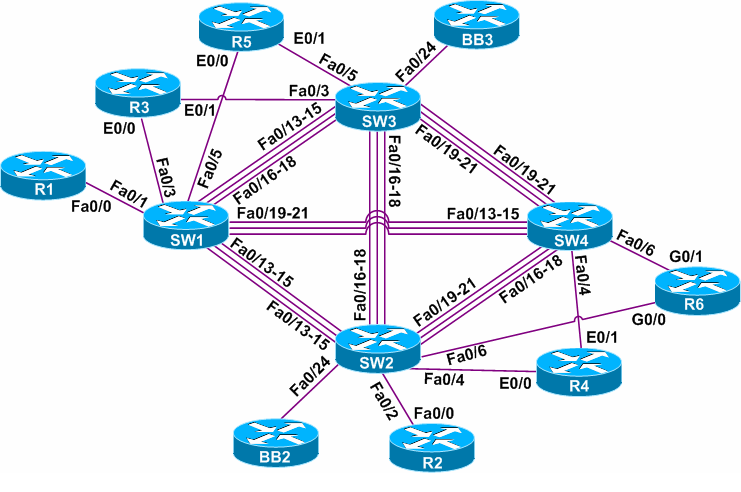
Each of these vendors uses a “lab topology” for all of their labs. Most of the topologies have 4 switches and 9 routers. 3 of the routers are “backbone” routers, pretty much the same as what you can expect on the CCIE R&S lab exam. The backbone routers are pre-configured and “out of your control”. They are used to inject routing information and some other neat tricks.
The number of routers & switches and also the interfaces, cables, router / switch models and IOS versions will depend on the topology that you are going to use.
To give you an idea what a lab topology looks like, here’s what INE uses:
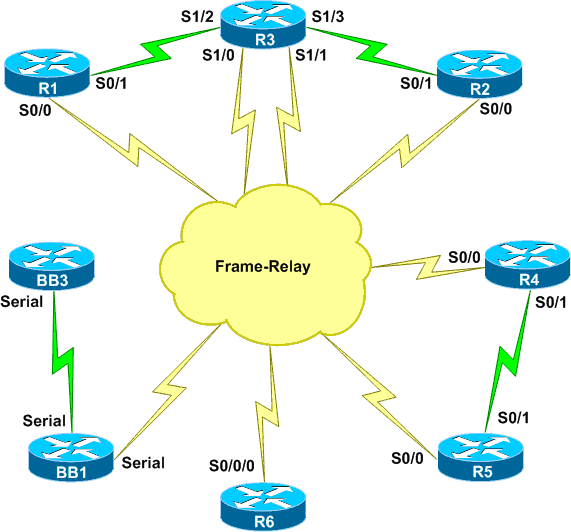
INE CCIE Rack Diagram 1INE CCIE Rack Diagram 2The routers are connected to each other using serial interfaces and there’s also a lot of FastEthernet links. You should first decide what vendor workbooks you want to use before you start thinking about lab equipment. Each vendor has a list with the routers, switches, interfaces and IOS versions that they use.
The physical topology never changes throughout the workbooks, you can make an infinite amount of logical topologies with a lab like this.
Having said that, let’s look at your choices when it comes to equipment.

Real Equipment

When i’m talking about real equipment I mean physical hardware, the stuff you buy on ebay. This sounds great right? Having your own lab, access it when and wherever you want.
It might sound great but I wouldn’t recommend it. I built my own lab but only because I wanted to keep it after I passed the lab. I’m still using it when I create tutorials for this website. Here are some of the disadvantages:
  • Building your own lab is expensive, even though you can sell most of the hardware when you are done studying. It’s hard to tell how much money you can still get for your old hardware 12 months from now, it’s possible that you won’t get much in return.
  • When you are on a budget you might be tempted to replace some routers or switches with cheaper models. The problem is that some features are not supported on the cheaper switches. For example, instead of the 3560 switch you can get a 3550 but it won’t support all IPv6 features or private VLANs. It will take time to find out what your lab can’t do.
  • You need a terminal server for remote console access. The Cisco 2511 is a great terminal server but it’s not cheap.
  • 9 routers and 4 switches draw quite some power, generate heat and make a lot of noise. This is not something you want in the living room…
  • Buying all the routers, switches and interfaces takes quite some time. You also need to make sure that the routers have enough RAM and Flash to store the IOS image.
  • Depending on where you live, it might be hard to get equipment. Ebay is great but shipping costs can be quite high.
Before you buy any hardware, double-check if you can use it for version 5 of the CCIE R&S lab. In the previous version (v4) the real lab had 4x 3560 switches so that’s what all vendors were using. Since version 5 of the lab exam, Cisco doesn’t use a particular switch model and the entire lab is virtual.
Cisco released a document where they explain which router and switch support all commands:
  • Cisco ISR 2900 with IOS 15.3T Universal software release
  • Cisco 3560X with IOS 15.0SE Universal (IP Services) software release
If you had to build an entire lab with these devices then it will be very expensive. The 2811 and 1841 routers are also able to run IOS 15.x so you can probably use those.
I checked the 3560x configuration guide and probably the old 3560 running the latest IOS 12.x release should cover 99% of those topics.
If money is no issue and you love owning your own lab, go for it. If your goal is just to become CCIE then I wouldn’t recommend doing this, it’s way too time consuming.

GNS3

GNS3 is a great emulator and quite useful when you are studying for CCIE R&S. This is great to use when you want to create some of your own labs / topologies when you are studying something on your own. I would not recommend to use it to build one of the vendor topologies however for the following reasons:
  • GNS3 does not support switches, only routers. The closest thing you can get to switching is using a switch module in a router but it only supports a fraction of the commands that you need for the CCIE R&S lab. You can get around this by connecting real switches to your GNS3 routers. This is done with a “breakout switch” or multiple network cards.
  • Support for IOS 15.x is limited. I believe only the 7200 router is able to run IOS 15 in GNS3, some of the other routers like the 3725 can’t do it.
  • You need quite some memory. Each router uses about 256MB so with 9 routers so you’ll need more than 2GB of RAM to run a large topology.
  • There are some bugs in GNS3 (it’s an emulator after all). There used to be some problems with Multicast and NTP. It really sucks when something is not working only to find out that your configuration is correct but GNS3 is acting quirky.
My advice…GNS3 is great for building some quick topologies and practice some labs of your own, don’t use it to build a full lab topology. Some little things like multicast don’t work well and connecting real switches to your virtual routers also introduces some problems. They take time to solve which is better spent at actual studying.

IOU (IOS on Unix)

Cisco doesn’t use real hardware anymore for the R&S lab or some of their rack rentals. IOU (IOS on Unix) is what they use now. Basically it’s an emulator (like GNS3) that runs on Unix / Solaris but it doesn’t use as much resources. There’s also IOL (IOS on Linux) which runs on x86 and Linux. Someone created a frontend for it which is called “web-IOU”.
IOU supports routers and also has some layer 2 images that supports switching commands. Not everything is supported but for switching it’s better than GNS3.
Right now Cisco hasn’t officially released IOU to the public and it also has some bugs. It’s possible that this is the future of CCIE home labs.

Cisco VIRL

Cisco’s emulator is called VIRL and supports the emulation of routers and switches (since April 2015). I haven’t tried it yet but I think VIRL will be a nice replacement for GNS3. Routing & switching support out of the box and it runs IOS 15.x. This might be an option but you’d have to see for yourself.

Rack Rentals

Rack rentals are simple…you pay and get telnet access to a remote lab that is cabled and configured for you.
You don’t have to worry about anything….hardware, interfaces, cabling, IOS images, GNS3, etc. It’s all done for you. Since the vendors I mentioned earlier are so popular, there are many companies that offer rack rentals for their topologies. This has some important advantages:
  • Everything is ready…you pay, get access and you can lab right away. You can spend your time at doing labs instead of building one.
  • The labs in the workbooks have startup configurations for each device and it takes time to copy/paste these to 13 devices. Most rack rentals have scripts that automatically copy the right startup configurations to all devices.

Conclusion

I recommend rack rentals as it is the most efficient way. Since you want to be a CCIE you need to focus on the #1 thing that will help you get there and that’s doing labs. Don’t waste your time at building a lab or messing with emulators. Use rack rentals and you can learn right away.
Hopefully, this has been helpful to you. Feel free to share it with your friends. If you have any questions or something to share, please leave a comment in our forum.

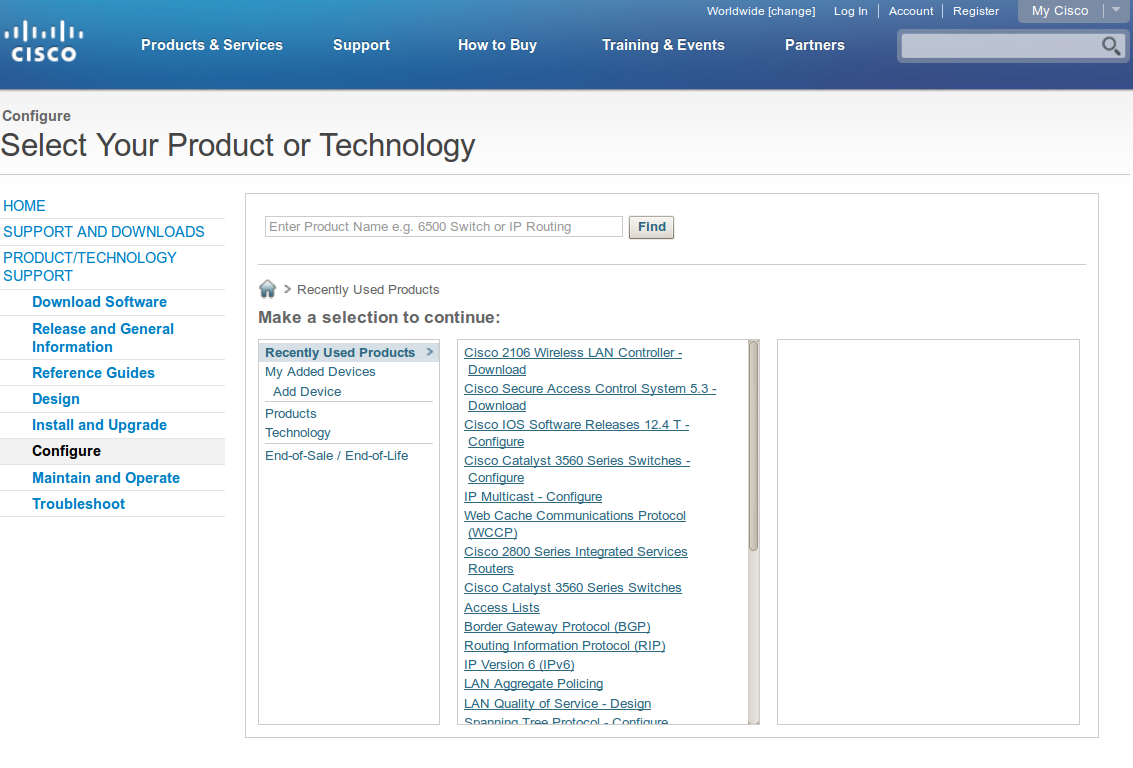
Useful links for CCIE R&S on the Cisco Doc CD

In this lesson I’ll add some useful links that you might want to remember when you take the CCIE R&S exam. All navigation starts from:

Ethertype Values

Some lab tasks might ask you to filter ARP, CDP, STP and such using ethertypes. You might remember most of them after awhile but if you want to look them up, some of them can be found in the wireless section:
  • Products
  • Wireless
  • Access Point
  • Cisco Aironet 350 Series
  • Configuration Guides
  • Cisco IOS Software Configuration Guide for Cisco Aironet Access Points, Cisco IOS Release 12.3(8)JA
And then select “Protocol Filters” to get to the list. Here’s the direct link if you want to see it.
They can also be found in the Bridging and IBM Networking Command Reference but i’m still figuring out how to get there without using the direct link.

Port and Protocol Numbers

If you don’t know a certain port or protocol number then you can find a useful list in the ASA section. Here’s how to get to it:
  • Products
  • Security
  • Firewalls
  • Adaptive Security Appliances (ASA)
  • Cisco ASA 5500 Series Next Generation Firewalls
  • Configuration Guides
  • Cisco Security Appliance Command Line Configuration Guide, Version 8.0
  • Reference
  • Addresses, Protocols and Ports
Here you will find TCP/UDP port numbers but also protocol numbers and ICMP numbers.

Regular Expressions

You should be familiar with regular expressions and how to use them for BGP, but just in case you can find them here:
  • Products
  • Cisco IOS and NX-OS Software
  • Cisco IOS
  • Cisco IOS Software Release 12.4 Family
  • Cisco IOS Software Releases 12.4 Mainline
  • Configuration Guides
  • Cisco IOS Terminal Services Configuration Guide, Release 12.4
  • Appendixes
  • Regular Expressions
Here’s the direct link if you want to take a look.

If I find anything else that is interesting I’ll add it here. If you have something to share please leave a comment in our forum!

How to use Cisco Documentation for CCIE

When you are studying for CCIE you will have to become familiar with the so called “doc cd”. There is no such thing as a Cisco Documentation CD anymore but that’s what most people still call it. Everything that you need can be found on the Cisco support site.
During the CCIE lab exam you will have access to the “configure” section of the Cisco support site. This is the URL that you should save:
You will end up at the following screen:
cisco support configure
Now the big question is…what can you use and more importantly, what is not available to use during the CCIE exam? Let’s start with the things that we can’t use during the lab exam:
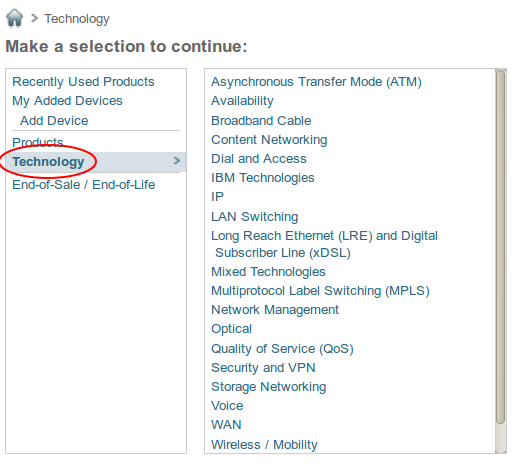
cisco support technology
The technology section has some very interesting FAQs, standards, design guides, white papers and config examples but they are NOT available to us during the CCIE lab exam. Don’t ignore it however, this is great stuff as you are studying and preparing at home. Just keep in mind that it’s not available during the CCIE lab exam! So what can we use during the lab exam? Let me show you:
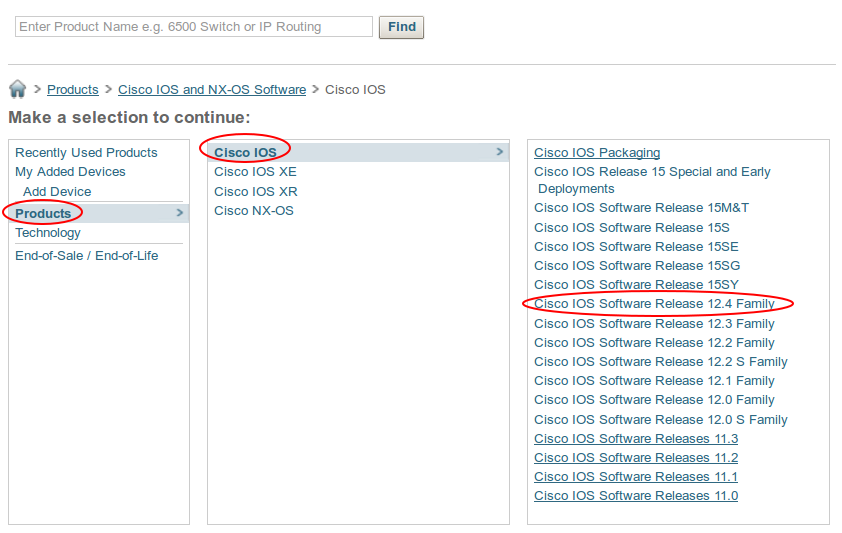
cisco support products ios
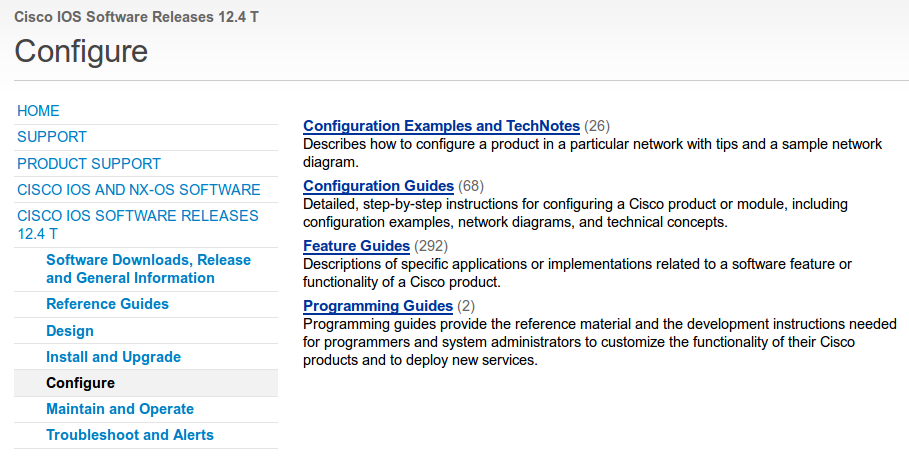
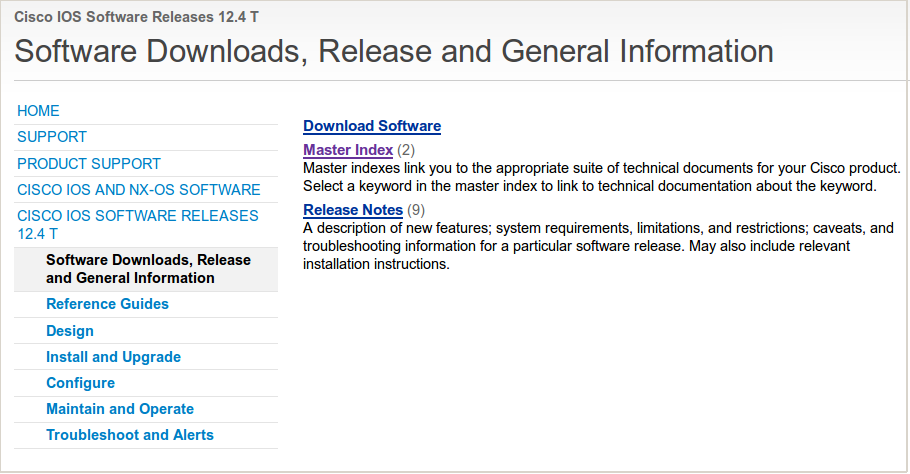
We will have access to the products section -> Cisco IOS -> Cisco IOS Software Release 12.4 Family -> Cisco IOS Software Releases 12.4 T. Once you click on it you will see this screen:
Cisco support IOS 12.4THere you will find everything you need for all the protocols that are running on our routers. Things like OSPF, EIGRP, BGP and everything else. You will find the most interesting information in the Configuration Guides. If you click on it and scroll down this is what you will find:
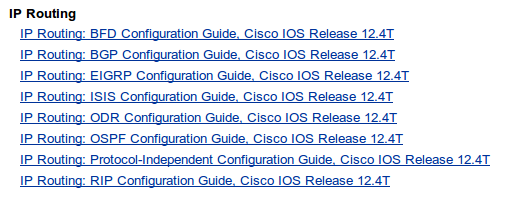
cisco support configuration ip routing
For example you can see the configuration guides for BGP, EIGRP, OSPF and RIP. If you click on them you will find everything you need. You also might want to look at the Master Index if you are looking for one particular command. Go back to the 12.4T overview and click on “Software Downloads, Release and General Information”:
cisco master index
The Master Index is an overview with all available commands. It’s useful when you forgot about a certain command, you can use your webbrowser’s search function to lookup commands.
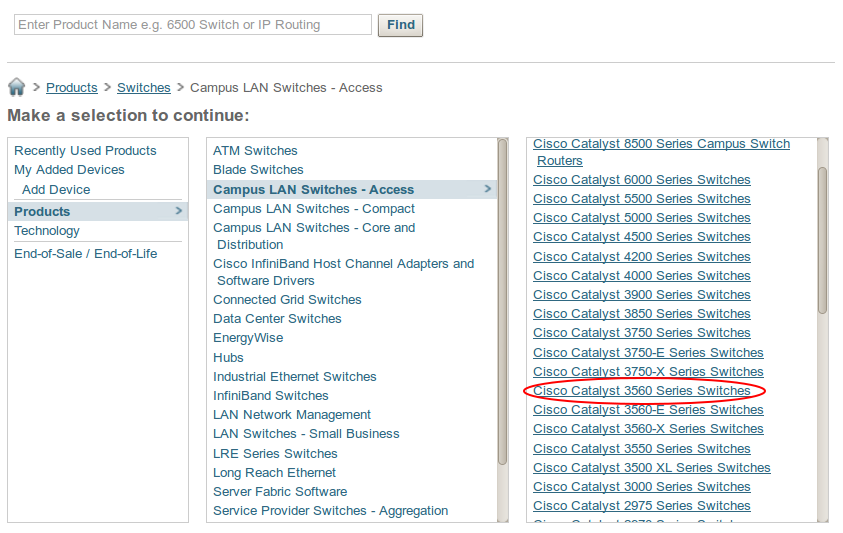
If you want to lookup something for your Cisco Catalyst 3560 switches you can use the following section on the support website:
cisco support switches
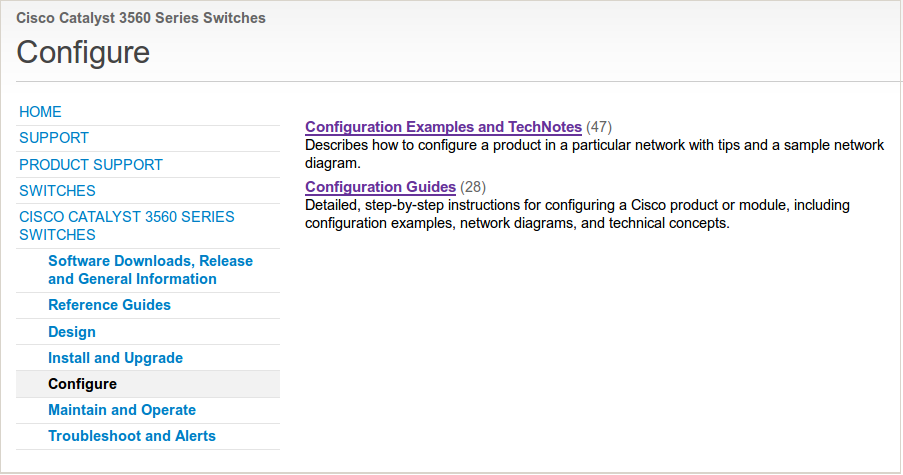
Just click on Products -> Switches -> Campus LAN Switches – Access -> Cisco Catalyst 3560 Series Switches and you will find the Configuration examples /guides. Here’s what it looks like:
Cisco 3560 configuration support
Keep in mind that search is disabled during the CCIE lab exam so you need to become familiar with the navigation. You are able to use your web browser’s search function however. Make sure you become familiar with the documentation support section from Cisco and don’t rely on Google too much as you are studying, this is the only tool that you will be allowed to use.
I hope this is helpful to you, good luck studying!

Cisco CCIE R&S Book Reading List

Before you can tackle the CCIE R&S lab there is a lot of information you have to absorb and one way or another you’ll have quite some reading to do. Some of the CCIE R&S reading lists might have 10 – 20 books but I believe you don’t have to read that many.
In this lesson you’ll find the books that I think you should read because they will truly help you understand all the topics you need to know for the lab.
Let’s get started!
Studying for the CCIE R&S lab is difficult, time-consuming and sometimes a personal struggle. This isn’t CCNA or CCNP where you can read 1 or 2 books, do some labs and pass the exam. It will take a LOT of your personal time to study so you need a battle plan.
Your CCIE Lab Success Strategy, The Non-Technical Guide Book helps with everything non-technical that is related to your CCIE journey. It gives you examples to create a study schedule, timetables but also lets you think about how to organize your personal life while you study for the lab. The book has plenty of useful tips and it is also very inspiring to read the story of others who already finished their CCIE journey.


Before you even think about the lab exam you need to get the CCIE written exam out of the way.  Without it, you can’t even book the lab so make sure you pass the written exam so you can focus on your real goal, the lab.
If you passed the CCNP exams then there are a couple of topics that you haven’t seen before like QoS and Multicast. The CCIE Routing and Switching Certification Guide covers all the exam blueprints so use it to study and pass the written exam.
This is the fourth edition but the fifth edition is right around the corner.


Routing TCP/IP Volume 1 is one of the classics on many CCIE R&S reading lists. I really enjoy Jeff Doyle’s writing style because he has a lot of configuration examples and explanations for show commands. This book covers routing in general but also RIP, OSPF, EIGRP and IS-IS.
You don’t have to know about RIP / IS-IS anymore for CCIE R&S but the sections on OSPF and EIGRP are still great to read. There is also a chapter about IPv6 but I think this might be a bit outdated by now (the book was written in 2005).


The second book by Jeff Doyle called Routing TCP/IP Volume 2 is also great to read. This book covers BGP, NAT and Multicast. If you just did CCNP then multicast is probably new to you. This book will help you get started to learn multicast. There is also a chapter about IPv6 but I would recommend to read another book for that (don’t worry it’s in this reading list).


Simply said, the Cisco OSPF Command and Configuration Handbook is probably the best book on CCIE level that explains everything you need to know about OSPF. It’s a big book (845 pages) so it teaches you a lot more about OSPF than the two routing TCP/IP books from Jeff Doyle or the Cisco Press Certification Guide. ‘
OSPF is an important topic on the lab so it’s worth your time to read this beast.


This is another book I really enjoyed to read. Sam Halabi’s Internet Routing Architectures (Second Edition) is all about BGP. Simply said, everything you need to know about BGP is in this book. It has great explanations, scenarios and configuration examples.


This book is something different compared to the other CCIE R&S books. Troubleshooting IP Routing Protocols explains what can go wrong with protocols like EIGRP, OSPF, PIM (Multicast) and BGP and then explains how to solve it.
For example, for EIGRP it will first show all the reasons why EIGRP doesn’t establish a neighbor adjacency and once that is fixed, it will show different reasons why some prefixes are not showing up in the topology or routing table.
Great to read to become better at troubleshooting!


If you read the CCIE Routing & Switching Certification guide and the Routing TCP/IP volume 2 book you already learned a thing or two about multicast. Developing IP Multicast Networks takes your multicast knowledge all the way up to CCIE R&S level.
It explains PIM sparse, dense and sparse-dense mode in depth but also inter-domain multicast routing. It’s not a very thick book (562 pages) and some of the chapters that cover DVMRP (Distance Vector Multicast Routing Protocol) you can skip because it’s not on the CCIE R&S blueprint.


QoS (Quality of Service) is a difficult topic to master and there’s a ton of stuff you need to understand for CCIE R&S. Originally, the Cisco Qos Exam Certification Guide by Wendell Odom was written for the old CCIP track (it was replaced by CCNP Service Provider) which had a QoS exam.
This book explains all the QoS mechanisms in detail and still covers everything you should know for the lab.


IPv6 Fundamentals, A Straightforward Approach to Understanding IPv6 is a good book because it covers things like IPv6 addressing and the routing protocols you need to know for the lab…RIPng, EIGRP, OSPFv3 and some of the tunneling techniques likes ISATAP and 6to4.
Cisco added a lot of IPv6 in the routing & switching track since the latest revision (march 2013) of CCNA. If you haven’t really caught up with IPv6, make sure you read this book.


MPLS Fundamentals teaches you a lot more than what you need to know for the CCIE R&S lab. It’s not just the “fundamentals” but this book takes you to an advanced level of MPLS.
You will learn a lot about MPLS from this book, perhaps even more than what you are required to know for the CCIE R&S lab exam.


That’s the end of my reading list. There are plenty of books but I believe these are really worth your time! Keep in mind that only reading isn’t going to get you any closer to beating the lab. Make sure you configure many of the things that you read in these books yourself so you get familiar with the commands and configurations.
You might have noticed that I don’t have any switching books in this list. I would like to add one, but to be honest I can’t really name a book that is worth adding. Cisco Press has a book called Cisco LAN Switching but it’s really outdated (still has CatOS commands) and the newer version of it isn’t complete enough for CCIE R&S.
Version 5 of the CCIE lab is also completely virtual so there’s no point learning “platform specific” topics like we had to do in version 4 with the Cisco Catalyst 3560 switches.
I hope this list is useful to you. Feel free to share it with your friends. If you feel I should add or remove any of the books…please share it in our forum.