Nowadays we use prefix-lists to filter BGP prefixes. Prefix-lists are very convenient since they allow you to specify a network address with a specific prefix length or a range of prefix lengths. Back in the days, before prefix-lists existed on Cisco IOS you had to use extended access-lists for this.
You really don’t want to use these anymore since the prefix-list does the same thing and the configuration is much easier. However, when you face a CCIE lab it might be possible that a task requires you to filter certain prefixes but you are not allowed to use the prefix-list. The extended access-list will be your only option then…
Having said that, let’s take a look how extended access-list filtering works. The “behavior” of the extended access-list is different compared to when you use it for filtering IP packets.
When you use IP as the protocol, here’s what the extended access-list normally looks like:

Above you see the source address with the source wildcard bits and the destination address with destination wildcard bits. Now forget what you have seen above, this is how the extended access-list works for BGP filtering:

Let me explain these fields:
- The first field is for the network address, for example 10.0.0.0.
- The second field is used to define what part of the network address to check. For example, when we specify 10.0.0.0 then we use wildcard bits to tell the router if we want to look for 10.0.0.0, 10.0.0.x, 10.0.x.x or 10.x.x.x.
- The subnet mask and its wildcard bits are used to define the prefix length, we can use this to tell the router to look for /24, /25, /26 or a range like /24 to /32.
Using the extended access-list for BGP filtering is something that is best explained with some examples. I’ll use two routers and some prefixes and we’ll walk through some different filtering examples.
Configuration
I will use the following two routers for this:
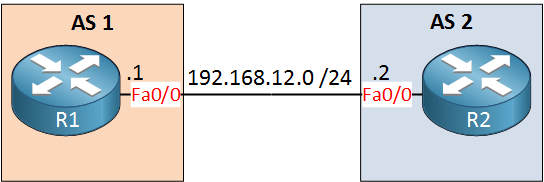
R2 has a bunch of loopback interfaces with different networks, we’ll use these to play with filtering.
Here’s what R2 advertises to R1:
R2#show ip bgp neighbors 192.168.12.1 advertised-routes
BGP table version is 35, local router ID is 192.168.7.25
Status codes: s suppressed, d damped, h history, * valid, > best, i - internal,
              r RIB-failure, S Stale, m multipath, b backup-path, x best-external, f RT-Filter
Origin codes: i - IGP, e - EGP, ? - incomplete

   Network          Next Hop            Metric LocPrf Weight Path
*> 10.0.0.0/24      0.0.0.0                  0         32768 i
*> 10.1.0.0/24      0.0.0.0                  0         32768 i
*> 10.2.0.0/24      0.0.0.0                  0         32768 i
*> 10.3.0.0/25      0.0.0.0                  0         32768 i
*> 10.3.0.128/25    0.0.0.0                  0         32768 i
*> 10.4.0.0/25      0.0.0.0                  0         32768 i
*> 10.4.0.128/25    0.0.0.0                  0         32768 i
*> 10.5.0.0/26      0.0.0.0                  0         32768 i
*> 10.6.0.0/27      0.0.0.0                  0         32768 i
*> 10.7.0.0/28      0.0.0.0                  0         32768 i
*> 10.8.1.0/24      0.0.0.0                  0         32768 i
*> 10.8.2.0/24      0.0.0.0                  0         32768 i
*> 20.0.0.0         0.0.0.0                  0         32768 i
*> 30.0.0.0         0.0.0.0                  0         32768 i
*> 172.16.0.0/24    0.0.0.0                  0         32768 i
*> 172.16.1.0/24    0.0.0.0                  0         32768 i
*> 172.16.2.0/25    0.0.0.0                  0         32768 i
*> 172.16.3.0/25    0.0.0.0                  0         32768 i
*> 172.16.4.0/26    0.0.0.0                  0         32768 i
*> 172.16.5.0/27    0.0.0.0                  0         32768 i
*> 172.16.6.0/28    0.0.0.0                  0         32768 i
*> 172.16.7.0/29    0.0.0.0                  0         32768 i
*> 192.168.0.0      0.0.0.0                  0         32768 i
*> 192.168.1.0      0.0.0.0                  0         32768 i
*> 192.168.2.0/25   0.0.0.0                  0         32768 i
*> 192.168.3.0/25   0.0.0.0                  0         32768 i
*> 192.168.4.0/26   0.0.0.0                  0         32768 i
*> 192.168.5.0/27   0.0.0.0                  0         32768 i
*> 192.168.6.0/28   0.0.0.0                  0         32768 i
*> 192.168.7.0/29   0.0.0.0                  0         32768 i
*> 192.168.7.8/29   0.0.0.0                  0         32768 i
*> 192.168.7.16/29  0.0.0.0                  0         32768 i
*> 192.168.7.24/30  0.0.0.0                  0         32768 i
*> 192.168.12.0     0.0.0.0                  0         32768 i

Total number of prefixes 34
Let’s start with some simple examples…
Filter specific prefixes
Let’s say that we to filter some specific prefixes, let’s pick:
- 20.0.0.0 /8
- 172.16.0.0 /24
- 192.168.1.0 /24
Here’s what the access-list will look like:
R1(config)#access-list 100 permit ip 20.0.0.0 0.0.0.0 255.0.0.0 0.0.0.0
R1(config)#access-list 100 permit ip 172.16.0.0 0.0.0.0 255.255.255.0 0.0.0.0
R1(config)#access-list 100 permit ip 192.168.1.0 0.0.0.0 255.255.255.0 0.0.0.0

R1(config)#router bgp 1
R1(config-router)#distribute-list 100 in

R1#clear ip bgp *
Before we check the result, let me explain the access-list:
- In the first entry we want an exact match for “20.0.0.0” so we use network 20.0.0.0 with wildcard 0.0.0.0. The prefix-length has to be exactly /8 so we use subnet mask 255.0.0.0 with wildcard 0.0.0.0.
- In the second entry we want an exact match for “172.16.0.0” so we use network 172.16.0.0 with wildcard 0.0.0.0. The prefix-length has to be exactly /24 so we use subnet mask 255.255.255.0 with wildcard 0.0.0.0.
- In the last entry we want an exact match for “192.168.1.0” so we use network 192.168.1.0 with wildcard 0.0.0.0. The prefix-length has to be exactly /24 so we use subnet mask 255.255.255.0 with wildcard 0.0.0.0.
Let’s see what we get:
R1#show ip bgp
BGP table version is 4, local router ID is 192.168.12.1
Status codes: s suppressed, d damped, h history, * valid, > best, i - internal,
              r RIB-failure, S Stale, m multipath, b backup-path, x best-external, f RT-Filter
Origin codes: i - IGP, e - EGP, ? - incomplete

   Network          Next Hop            Metric LocPrf Weight Path
r> 20.0.0.0         192.168.12.2             0             0 2 i
r> 172.16.0.0/24    192.168.12.2             0             0 2 i
r> 192.168.1.0      192.168.12.2             0             0 2 i
Great, we only see our three specific prefixes.
In my BGP table, you can see R1 is unable to install these prefixes because of a RIB-failure. This seems to occur because the router refuses to use the next hop IP address unless you permit it. I couldn’t find anything about this in the Cisco documentation but you can solve it by adding this statement to access-list 100:
permit ip host 192.168.12.2 any
One little “extra” that the access-list offers us that the prefix-list doesn’t is that it shows matches:
R1#show access-lists 100
Extended IP access list 100
    10 permit ip host 20.0.0.0 host 255.0.0.0 (2 matches)
    20 permit ip host 172.16.0.0 host 255.255.255.0 (1 match)
    30 permit ip host 192.168.1.0 host 255.255.255.0 (2 matches)
Let’s try something else now!
Filter all 192.168.x.0 networks with a /24 prefix length
Let’s say that we want to filter all networks in the 192.168.x.0 range that have a /24 prefix length. R2 is currently advertising these networks:
R2#show ip bgp neighbors 192.168.12.1 advertised-routes | include 192.168.
BGP table version is 36, local router ID is 192.168.7.17
*> 192.168.0.0      0.0.0.0                  0         32768 i
*> 192.168.1.0      0.0.0.0                  0         32768 i
*> 192.168.2.0/25   0.0.0.0                  0         32768 i
*> 192.168.3.0/25   0.0.0.0                  0         32768 i
*> 192.168.4.0/26   0.0.0.0                  0         32768 i
*> 192.168.5.0/27   0.0.0.0                  0         32768 i
*> 192.168.6.0/28   0.0.0.0                  0         32768 i
*> 192.168.7.0/29   0.0.0.0                  0         32768 i
*> 192.168.7.8/29   0.0.0.0                  0         32768 i
*> 192.168.7.16/29  0.0.0.0                  0         32768 i
*> 192.168.7.24/30  0.0.0.0                  0         32768 i
*> 192.168.12.0     0.0.0.0                  0         32768 i
We only want to see 192.168.0.0 /24, 192.168.1.0 /24 and 192.168.12.0 /24 on R1. Here’s the access-list we will create:
R1(config)#access-list 101 permit ip 192.168.0.0 0.0.255.0 255.255.255.0 0.0.0.0

R1(config)#router bgp 1
R1(config-router)#distribute-list 101 in

R1#clear ip bgp *
Let me explain the access-list:
- The network address we want to check is 192.168.0.0.
- The wildcard is 0.0.255.0 which means the 1st, 2nd and 4th octet have to match. We don’t care about the 3rd octet.
- The subnet mask is 255.255.255.0 and this has to match exactly which is why we use a 0.0.0.0 wildcard.
Here’s the result:
R1#show ip bgp
BGP table version is 4, local router ID is 192.168.12.1
Status codes: s suppressed, d damped, h history, * valid, > best, i - internal,
              r RIB-failure, S Stale, m multipath, b backup-path, x best-external, f RT-Filter
Origin codes: i - IGP, e - EGP, ? - incomplete

   Network          Next Hop            Metric LocPrf Weight Path
r> 192.168.0.0      192.168.12.2             0             0 2 i
r> 192.168.1.0      192.168.12.2             0             0 2 i
r> 192.168.12.0     192.168.12.2             0             0 2 i
Great, these are the only 192.168.x.0 /24 networks that we have. Time for the next example…
Filter all 10.x.x.0 networks with a /24 prefix length
This one is similar to the previous example but this time we check the 10.x.x.0 range. Here are the networks that R2 is advertising:
R2#show ip bgp neighbors 192.168.12.1 advertised-routes | include 10.
*> 10.0.0.0/24      0.0.0.0                  0         32768 i
*> 10.1.0.0/24      0.0.0.0                  0         32768 i
*> 10.2.0.0/24      0.0.0.0                  0         32768 i
*> 10.3.0.0/25      0.0.0.0                  0         32768 i
*> 10.3.0.128/25    0.0.0.0                  0         32768 i
*> 10.4.0.0/25      0.0.0.0                  0         32768 i
*> 10.4.0.128/25    0.0.0.0                  0         32768 i
*> 10.5.0.0/26      0.0.0.0                  0         32768 i
*> 10.6.0.0/27      0.0.0.0                  0         32768 i
*> 10.7.0.0/28      0.0.0.0                  0         32768 i
*> 10.8.1.0/24      0.0.0.0                  0         32768 i
*> 10.8.2.0/24      0.0.0.0                  0         32768 i
Let’s build an access-list:
R1(config)#access-list 102 permit ip 10.0.0.0 0.255.255.0 255.255.255.0 0.0.0.0

R1(config)#router bgp 1
R1(config-router)#distribute-list 102 in

R1#clear ip bgp *
Let me explain the access-list:
- The network we want to check is 10.0.0.0 but we only care about the 1st and 4th octet, the 2nd and 3rd octet can be everything so we use wildcard 0.255.255.0.
- We want all networks with a /24 prefix length so we use 255.255.255.0 as the subnet mask. This has to be an exact match so we use 0.0.0.0 as the wildcard.
Here’s what we get:
R1#show ip bgp
BGP table version is 6, local router ID is 192.168.12.1
Status codes: s suppressed, d damped, h history, * valid, > best, i - internal,
              r RIB-failure, S Stale, m multipath, b backup-path, x best-external, f RT-Filter
Origin codes: i - IGP, e - EGP, ? - incomplete

   Network          Next Hop            Metric LocPrf Weight Path
r> 10.0.0.0/24      192.168.12.2             0             0 2 i
r> 10.1.0.0/24      192.168.12.2             0             0 2 i
r> 10.2.0.0/24      192.168.12.2             0             0 2 i
r> 10.8.1.0/24      192.168.12.2             0             0 2 i
r> 10.8.2.0/24      192.168.12.2             0             0 2 i
Great, these are all networks in the 10.x.x.0 range with a /24 prefix length. Let’s try something else…
Filter all 10.x.x.x networks with a /25 prefix length
This time I want to see all networks in the 10.x.x.x range with a /25 prefix length. Here are all 10.x.x.x networks that R2 is advertising again:
R2#show ip bgp neighbors 192.168.12.1 advertised-routes | include 10.
*> 10.0.0.0/24      0.0.0.0                  0         32768 i
*> 10.1.0.0/24      0.0.0.0                  0         32768 i
*> 10.2.0.0/24      0.0.0.0                  0         32768 i
*> 10.3.0.0/25      0.0.0.0                  0         32768 i
*> 10.3.0.128/25    0.0.0.0                  0         32768 i
*> 10.4.0.0/25      0.0.0.0                  0         32768 i
*> 10.4.0.128/25    0.0.0.0                  0         32768 i
*> 10.5.0.0/26      0.0.0.0                  0         32768 i
*> 10.6.0.0/27      0.0.0.0                  0         32768 i
*> 10.7.0.0/28      0.0.0.0                  0         32768 i
*> 10.8.1.0/24      0.0.0.0                  0         32768 i
*> 10.8.2.0/24      0.0.0.0                  0         32768 i
Here’s the access-list:
R1(config)#access-list 103 permit ip 10.0.0.0 0.255.255.255 255.255.255.128 0.0.0.0

R1(config)#router bgp 1
R1(config-router)#distribute-list 103 in

R1#clear ip bgp *
Let me explain the access-list:
- We want to check the 10.0.0.0 network but we don’t care about the 2nd, 3th or 4th octet. That’s why we use a 0.255.255.255 wildcard.
- The subnet mask is 255.255.255.128 which equals /25. It has to be an exact match so we use wildcard 0.0.0.0.
Here’s what you will find:
R1#show ip bgp
BGP table version is 5, local router ID is 192.168.12.1
Status codes: s suppressed, d damped, h history, * valid, > best, i - internal,
              r RIB-failure, S Stale, m multipath, b backup-path, x best-external, f RT-Filter
Origin codes: i - IGP, e - EGP, ? - incomplete

   Network          Next Hop            Metric LocPrf Weight Path
r> 10.3.0.0/25      192.168.12.2             0             0 2 i
r> 10.3.0.128/25    192.168.12.2             0             0 2 i
r> 10.4.0.0/25      192.168.12.2             0             0 2 i
r> 10.4.0.128/25    192.168.12.2             0             0 2 i
Excellent, these are all 10.x.x.x networks with a /25 prefix length.
Filter all 192.168.7.x networks with any prefix length
This example will be a bit different. This time I want to filter all networks that start with 192.168.7.x but I don’t care about the prefix length. We are talking about the following prefixes:
R2#show ip bgp neighbors 192.168.12.1 advertised-routes | incl 192.168.7
BGP table version is 36, local router ID is 192.168.7.17
*> 192.168.7.0/29   0.0.0.0                  0         32768 i
*> 192.168.7.8/29   0.0.0.0                  0         32768 i
*> 192.168.7.16/29  0.0.0.0                  0         32768 i
*> 192.168.7.24/30  0.0.0.0                  0         32768 i
Here’s the access-list:
R1(config)#access-list 104 permit ip 192.168.7.0 0.0.0.255 255.255.255.0 0.0.0.255

R1(config)#router bgp 1
R1(config-router)#distribute-list 104 in

R1#clear ip bgp *
Let me walk you through the access-list:
- We are looking for network 192.168.7.0 but we only want to check the first three octets, that’s why we use wildcard 0.0.0.255.
- We don’t care about the prefix length, it should be at least a /24 since we are looking at the 192.168.7.x range but it doesn’t matter if it’s a /25, /26, etc. This is why we use subnet mask 255.255.255.0 with wildcard 0.0.0.255. It means that we don’t care about the prefix length in the 4th octet.
Here’s the result:
R1#show ip bgp
BGP table version is 5, local router ID is 192.168.12.1
Status codes: s suppressed, d damped, h history, * valid, > best, i - internal,
              r RIB-failure, S Stale, m multipath, b backup-path, x best-external, f RT-Filter
Origin codes: i - IGP, e - EGP, ? - incomplete

   Network          Next Hop            Metric LocPrf Weight Path
r> 192.168.7.0/29   192.168.12.2             0             0 2 i
r> 192.168.7.8/29   192.168.12.2             0             0 2 i
r> 192.168.7.16/29  192.168.12.2             0             0 2 i
r> 192.168.7.24/30  192.168.12.2             0             0 2 i
R1 will only have these networks in its BGP table now, everything else will be filtered.
Filter anything with a /24 to /32 prefix length
Time for something different, we don’t care about the network address but we only want to see networks with a prefix length between /24 and /32. Let’s take a look again what R2 is advertising to us:
R2#show ip bgp neighbors 192.168.12.1 advertised-routes
BGP table version is 35, local router ID is 192.168.7.25
Status codes: s suppressed, d damped, h history, * valid, > best, i - internal,
              r RIB-failure, S Stale, m multipath, b backup-path, x best-external, f RT-Filter
Origin codes: i - IGP, e - EGP, ? - incomplete

   Network          Next Hop            Metric LocPrf Weight Path
*> 10.0.0.0/24      0.0.0.0                  0         32768 i
*> 10.1.0.0/24      0.0.0.0                  0         32768 i
*> 10.2.0.0/24      0.0.0.0                  0         32768 i
*> 10.3.0.0/25      0.0.0.0                  0         32768 i
*> 10.3.0.128/25    0.0.0.0                  0         32768 i
*> 10.4.0.0/25      0.0.0.0                  0         32768 i
*> 10.4.0.128/25    0.0.0.0                  0         32768 i
*> 10.5.0.0/26      0.0.0.0                  0         32768 i
*> 10.6.0.0/27      0.0.0.0                  0         32768 i
*> 10.7.0.0/28      0.0.0.0                  0         32768 i
*> 10.8.1.0/24      0.0.0.0                  0         32768 i
*> 10.8.2.0/24      0.0.0.0                  0         32768 i
*> 20.0.0.0         0.0.0.0                  0         32768 i
*> 30.0.0.0         0.0.0.0                  0         32768 i
*> 172.16.0.0/24    0.0.0.0                  0         32768 i
   Network          Next Hop            Metric LocPrf Weight Path
*> 172.16.1.0/24    0.0.0.0                  0         32768 i
*> 172.16.2.0/25    0.0.0.0                  0         32768 i
*> 172.16.3.0/25    0.0.0.0                  0         32768 i
*> 172.16.4.0/26    0.0.0.0                  0         32768 i
*> 172.16.5.0/27    0.0.0.0                  0         32768 i
*> 172.16.6.0/28    0.0.0.0                  0         32768 i
*> 172.16.7.0/29    0.0.0.0                  0         32768 i
*> 192.168.0.0      0.0.0.0                  0         32768 i
*> 192.168.1.0      0.0.0.0                  0         32768 i
*> 192.168.2.0/25   0.0.0.0                  0         32768 i
*> 192.168.3.0/25   0.0.0.0                  0         32768 i
*> 192.168.4.0/26   0.0.0.0                  0         32768 i
*> 192.168.5.0/27   0.0.0.0                  0         32768 i
*> 192.168.6.0/28   0.0.0.0                  0         32768 i
*> 192.168.7.0/29   0.0.0.0                  0         32768 i
*> 192.168.7.8/29   0.0.0.0                  0         32768 i
*> 192.168.7.16/29  0.0.0.0                  0         32768 i
*> 192.168.7.24/30  0.0.0.0                  0         32768 i
*> 192.168.12.0     0.0.0.0                  0         32768 i

Total number of prefixes 34
We have a big list with prefixes, most of them have a prefix length that is larger than /24. We do have 20.0.0.0 /8 and 30.0.0.0 /8 that will be gone when we create this filter. Time to find out:
R1(config)#access-list 105 permit ip 0.0.0.0 255.255.255.255 255.255.255.0 0.0.0.255

R1(config)#router bgp 1
R1(config-router)#distribute-list 105 in

R1#clear ip bgp *
Here’s how the access-list works:
- We don’t care about the network so the network address is 0.0.0.0 with wildcard 255.255.255.255.
- We want all prefixes with a prefix length of at least /24, that’s why we pick a subnet mask of 255.255.255.0 and a wildcard of 0.0.0.255. This means we don’t care about the 4th octet so it will match everything from /24 to /32.
Let’s find out if it works:
R1#show ip bgp
BGP table version is 33, local router ID is 192.168.12.1
Status codes: s suppressed, d damped, h history, * valid, > best, i - internal,
              r RIB-failure, S Stale, m multipath, b backup-path, x best-external, f RT-Filter
Origin codes: i - IGP, e - EGP, ? - incomplete

   Network          Next Hop            Metric LocPrf Weight Path
r> 10.0.0.0/24      192.168.12.2             0             0 2 i
r> 10.1.0.0/24      192.168.12.2             0             0 2 i
r> 10.2.0.0/24      192.168.12.2             0             0 2 i
r> 10.3.0.0/25      192.168.12.2             0             0 2 i
r> 10.3.0.128/25    192.168.12.2             0             0 2 i
r> 10.4.0.0/25      192.168.12.2             0             0 2 i
r> 10.4.0.128/25    192.168.12.2             0             0 2 i
r> 10.5.0.0/26      192.168.12.2             0             0 2 i
r> 10.6.0.0/27      192.168.12.2             0             0 2 i
r> 10.7.0.0/28      192.168.12.2             0             0 2 i
r> 10.8.1.0/24      192.168.12.2             0             0 2 i
r> 10.8.2.0/24      192.168.12.2             0             0 2 i
r> 172.16.0.0/24    192.168.12.2             0             0 2 i
r> 172.16.1.0/24    192.168.12.2             0             0 2 i
r> 172.16.2.0/25    192.168.12.2             0             0 2 i
r> 172.16.3.0/25    192.168.12.2             0             0 2 i
r> 172.16.4.0/26    192.168.12.2             0             0 2 i
r> 172.16.5.0/27    192.168.12.2             0             0 2 i
r> 172.16.6.0/28    192.168.12.2             0             0 2 i
r> 172.16.7.0/29    192.168.12.2             0             0 2 i
r> 192.168.0.0      192.168.12.2             0             0 2 i
r> 192.168.1.0      192.168.12.2             0             0 2 i
r> 192.168.2.0/25   192.168.12.2             0             0 2 i
r> 192.168.3.0/25   192.168.12.2             0             0 2 i
r> 192.168.4.0/26   192.168.12.2             0             0 2 i
r> 192.168.5.0/27   192.168.12.2             0             0 2 i
r> 192.168.6.0/28   192.168.12.2             0             0 2 i
r> 192.168.7.0/29   192.168.12.2             0             0 2 i
r> 192.168.7.8/29   192.168.12.2             0             0 2 i
r> 192.168.7.16/29  192.168.12.2             0             0 2 i
r> 192.168.7.24/30  192.168.12.2             0             0 2 i
r> 192.168.12.0     192.168.12.2             0             0 2 i
Our 20.0.0.0 /8 and 30.0.0.0 /8 prefixes are now gone from the BGP table, everything you see above has at least a /24 prefix length.
Filter anything with a /26 to /32 prefix length
This example is exactly the same as the previous example but this time the prefix length has to be at least a /26. Here’s the list with advertised prefixes from R2 again:
R2#show ip bgp neighbors 192.168.12.1 advertised-routes
BGP table version is 35, local router ID is 192.168.7.25
Status codes: s suppressed, d damped, h history, * valid, > best, i - internal,
              r RIB-failure, S Stale, m multipath, b backup-path, x best-external, f RT-Filter
Origin codes: i - IGP, e - EGP, ? - incomplete

   Network          Next Hop            Metric LocPrf Weight Path
*> 10.0.0.0/24      0.0.0.0                  0         32768 i
*> 10.1.0.0/24      0.0.0.0                  0         32768 i
*> 10.2.0.0/24      0.0.0.0                  0         32768 i
*> 10.3.0.0/25      0.0.0.0                  0         32768 i
*> 10.3.0.128/25    0.0.0.0                  0         32768 i
*> 10.4.0.0/25      0.0.0.0                  0         32768 i
*> 10.4.0.128/25    0.0.0.0                  0         32768 i
*> 10.5.0.0/26      0.0.0.0                  0         32768 i
*> 10.6.0.0/27      0.0.0.0                  0         32768 i
*> 10.7.0.0/28      0.0.0.0                  0         32768 i
*> 10.8.1.0/24      0.0.0.0                  0         32768 i
*> 10.8.2.0/24      0.0.0.0                  0         32768 i
*> 20.0.0.0         0.0.0.0                  0         32768 i
*> 30.0.0.0         0.0.0.0                  0         32768 i
*> 172.16.0.0/24    0.0.0.0                  0         32768 i
*> 172.16.1.0/24    0.0.0.0                  0         32768 i
*> 172.16.2.0/25    0.0.0.0                  0         32768 i
*> 172.16.3.0/25    0.0.0.0                  0         32768 i
*> 172.16.4.0/26    0.0.0.0                  0         32768 i
*> 172.16.5.0/27    0.0.0.0                  0         32768 i
*> 172.16.6.0/28    0.0.0.0                  0         32768 i
*> 172.16.7.0/29    0.0.0.0                  0         32768 i
*> 192.168.0.0      0.0.0.0                  0         32768 i
*> 192.168.1.0      0.0.0.0                  0         32768 i
*> 192.168.2.0/25   0.0.0.0                  0         32768 i
*> 192.168.3.0/25   0.0.0.0                  0         32768 i
*> 192.168.4.0/26   0.0.0.0                  0         32768 i
*> 192.168.5.0/27   0.0.0.0                  0         32768 i
*> 192.168.6.0/28   0.0.0.0                  0         32768 i
*> 192.168.7.0/29   0.0.0.0                  0         32768 i
*> 192.168.7.8/29   0.0.0.0                  0         32768 i
*> 192.168.7.16/29  0.0.0.0                  0         32768 i
*> 192.168.7.24/30  0.0.0.0                  0         32768 i
*> 192.168.12.0     0.0.0.0                  0         32768 i

Total number of prefixes 34
Time to clean up that BGP table. Here’s the access-list we need:
R1(config)#access-list 106 permit ip 0.0.0.0 255.255.255.255 255.255.255.192 0.0.0.63

R1(config)#router bgp 1
R1(config-router)#distribute-list 106 in

R1#clear ip bgp *
Here’s how the access-list works:
- We don’t care about the network address so we use 0.0.0.0 as the network address with wildcard 255.255.255.255.
- The prefix length has to be at least /26, that’s a 255.255.255.192 subnet mask.
- We want to match all prefixes from /26 to /32, by using this wildcard we tell the router that the last six bits have to match, we don’t care about the first two bits. This will match subnet mask 255.255.255.192, 255.255.255.224, 255.255.255.240, 255.255.255.248, 255.255.255.252, 255.255.255.254 and 255.255.255.255 (everything from /26 to /32).
Here’s the end result:
R1#show ip bgp
BGP table version is 15, local router ID is 192.168.12.1
Status codes: s suppressed, d damped, h history, * valid, > best, i - internal,
              r RIB-failure, S Stale, m multipath, b backup-path, x best-external, f RT-Filter
Origin codes: i - IGP, e - EGP, ? - incomplete

   Network          Next Hop            Metric LocPrf Weight Path
r> 10.5.0.0/26      192.168.12.2             0             0 2 i
r> 10.6.0.0/27      192.168.12.2             0             0 2 i
r> 10.7.0.0/28      192.168.12.2             0             0 2 i
r> 172.16.4.0/26    192.168.12.2             0             0 2 i
r> 172.16.5.0/27    192.168.12.2             0             0 2 i
r> 172.16.6.0/28    192.168.12.2             0             0 2 i
r> 172.16.7.0/29    192.168.12.2             0             0 2 i
r> 192.168.4.0/26   192.168.12.2             0             0 2 i
r> 192.168.5.0/27   192.168.12.2             0             0 2 i
r> 192.168.6.0/28   192.168.12.2             0             0 2 i
r> 192.168.7.0/29   192.168.12.2             0             0 2 i
r> 192.168.7.8/29   192.168.12.2             0             0 2 i
r> 192.168.7.16/29  192.168.12.2             0             0 2 i
r> 192.168.7.24/30  192.168.12.2             0             0 2 i
Above you can see that all prefixes below /26 have disappeared.
Filter 172.16.0.0 networks with a /27 to /32 prefix length
This example will be similar to the previous one with the exception that we will check a specific network range. Here are all networks in the 172.16.x.x range that R2 offers us:
R2#show ip bgp neighbors 192.168.12.1 advertised-routes | include 172.16.
*> 172.16.0.0/24    0.0.0.0                  0         32768 i
*> 172.16.1.0/24    0.0.0.0                  0         32768 i
*> 172.16.2.0/25    0.0.0.0                  0         32768 i
*> 172.16.3.0/25    0.0.0.0                  0         32768 i
*> 172.16.4.0/26    0.0.0.0                  0         32768 i
*> 172.16.5.0/27    0.0.0.0                  0         32768 i
*> 172.16.6.0/28    0.0.0.0                  0         32768 i
*> 172.16.7.0/29    0.0.0.0                  0         32768 i
Let’s see if we can filter these…
R1(config)#$access-list 107 permit ip 172.16.0.0 0.0.255.255 255.255.255.224 0.0.0.31

R1(config)#router bgp 1

R1(config-router)#distribute-list 107 in

R1#clear ip bgp *
Here’s how the access-list works:
- We want to check network 172.16.0.0 but we don’t care about the 3rd or 4th octet so we use wildcard 0.0.255.255.
- The prefix length should be at least /27 so we use a subnet mask of 255.255.255.224.
- We want to match all subnet masks from /27 to /32 so we use a wildcard of 0.0.0.31. This means the first three octets have to match and the last four bits of the 4th octet. This will allow subnet mask 255.255.255.192, 255.255.255.224, 255.255.255.240, 255.255.255.248, 255.255.255.252, 255.255.255.254 and 255.255.255.255.
Here’s the end result:
R1#show ip bgp
BGP table version is 4, local router ID is 192.168.12.1
Status codes: s suppressed, d damped, h history, * valid, > best, i - internal,
              r RIB-failure, S Stale, m multipath, b backup-path, x best-external, f RT-Filter
Origin codes: i - IGP, e - EGP, ? - incomplete

   Network          Next Hop            Metric LocPrf Weight Path
r> 172.16.5.0/27    192.168.12.2             0             0 2 i
r> 172.16.6.0/28    192.168.12.2             0             0 2 i
r> 172.16.7.0/29    192.168.12.2             0             0 2 i
Great, we only have a few 172.16.x.x networks with a /27 prefix length or larger.
Conclusion
You have now seen quite some examples of how you can use BGP filtering with extended access-lists. This can be pretty annoying and it’s much easier to use prefix-lists instead. However if you are not allowed to use them, you now know how to filter with extended access-lists.
hostname R1
!
interface FastEthernet0/0
 ip address 192.168.12.1 255.255.255.0
 duplex auto
 speed auto
!
router bgp 1
 bgp log-neighbor-changes
 neighbor 192.168.12.2 remote-as 2
 distribute-list 107 in
!
access-list 100 permit ip host 20.0.0.0 host 255.0.0.0
access-list 100 permit ip host 172.16.0.0 host 255.255.255.0
access-list 100 permit ip host 192.168.1.0 host 255.255.255.0
access-list 101 permit ip 192.168.0.0 0.0.255.0 host 255.255.255.0
access-list 102 permit ip 10.0.0.0 0.255.255.0 host 255.255.255.0
access-list 103 permit ip 10.0.0.0 0.255.255.255 host 255.255.255.128
access-list 104 permit ip 192.168.7.0 0.0.0.255 255.255.255.0 0.0.0.255
access-list 105 permit ip any 255.255.255.0 0.0.0.255
access-list 106 permit ip any 255.255.255.192 0.0.0.63
access-list 107 permit ip 172.16.0.0 0.0.255.255 255.255.255.224 0.0.0.31
!
end
hostname R2
!
interface Loopback0
ip address 10.0.0.1 255.255.255.0
!
interface Loopback1
ip address 10.1.0.1 255.255.255.0
!
interface Loopback2
ip address 10.2.0.1 255.255.255.0
!
interface Loopback3
ip address 10.3.0.1 255.255.255.128
!
interface Loopback4
ip address 10.3.0.129 255.255.255.128
!
interface Loopback5
ip address 10.4.0.1 255.255.255.128
!
interface Loopback6
ip address 10.4.0.129 255.255.255.128
!
interface Loopback7
ip address 10.5.0.1 255.255.255.192
!
interface Loopback8
ip address 10.6.0.1 255.255.255.224
!
interface Loopback9
ip address 10.7.0.1 255.255.255.240
!
interface Loopback10
ip address 10.8.1.1 255.255.255.0
!
interface Loopback11
ip address 10.8.2.1 255.255.255.0
!
interface Loopback12
ip address 20.0.0.1 255.0.0.0
!
interface Loopback13
ip address 30.0.0.1 255.0.0.0
!
interface Loopback14
ip address 172.16.0.1 255.255.255.0
!
interface Loopback15
ip address 172.16.1.1 255.255.255.0
!
interface Loopback16
ip address 172.16.2.1 255.255.255.128
!
interface Loopback17
ip address 172.16.3.1 255.255.255.128
!
interface Loopback18
ip address 172.16.4.1 255.255.255.192
!
interface Loopback19
ip address 172.16.5.1 255.255.255.224
!
interface Loopback20
ip address 172.16.6.1 255.255.255.240
!
interface Loopback21
ip address 172.16.7.1 255.255.255.248
!
interface Loopback22
ip address 192.168.0.1 255.255.255.0
!
interface Loopback23
ip address 192.168.1.1 255.255.255.0
!
interface Loopback24
ip address 192.168.2.1 255.255.255.128
!
interface Loopback25
ip address 192.168.3.1 255.255.255.128
!
interface Loopback26
ip address 192.168.4.1 255.255.255.192
!
interface Loopback27
ip address 192.168.5.1 255.255.255.224
!
interface Loopback28
ip address 192.168.6.1 255.255.255.240
!
interface Loopback29
ip address 192.168.7.1 255.255.255.248
!
interface Loopback30
ip address 192.168.7.9 255.255.255.248
!
interface Loopback31
ip address 192.168.7.17 255.255.255.248
!
interface Loopback32
ip address 192.168.7.25 255.255.255.252
!
interface FastEthernet0/0
ip address 192.168.12.2 255.255.255.0
duplex auto
speed auto
!
router bgp 2
bgp log-neighbor-changes
network 10.0.0.0 mask 255.255.255.0
network 10.1.0.0 mask 255.255.255.0
network 10.2.0.0 mask 255.255.255.0
network 10.3.0.0 mask 255.255.255.128
network 10.3.0.128 mask 255.255.255.128
network 10.4.0.0 mask 255.255.255.128
network 10.4.0.128 mask 255.255.255.128
network 10.5.0.0 mask 255.255.255.192
network 10.6.0.0 mask 255.255.255.224
network 10.7.0.0 mask 255.255.255.240
network 10.8.0.0 mask 255.255.255.224
network 10.8.1.0 mask 255.255.255.0
network 10.8.2.0 mask 255.255.255.0
network 20.0.0.0
network 30.0.0.0
network 172.16.0.0 mask 255.255.255.0
network 172.16.1.0 mask 255.255.255.0
network 172.16.2.0 mask 255.255.255.128
network 172.16.3.0 mask 255.255.255.128
network 172.16.4.0 mask 255.255.255.192
network 172.16.5.0 mask 255.255.255.224
network 172.16.6.0 mask 255.255.255.240
network 172.16.7.0 mask 255.255.255.248
network 192.168.0.0
network 192.168.1.0
network 192.168.2.0 mask 255.255.255.128
network 192.168.3.0 mask 255.255.255.128
network 192.168.4.0 mask 255.255.255.192
network 192.168.5.0 mask 255.255.255.224
network 192.168.6.0 mask 255.255.255.240
network 192.168.7.0 mask 255.255.255.248
network 192.168.7.8 mask 255.255.255.248
network 192.168.7.16 mask 255.255.255.248
network 192.168.7.24 mask 255.255.255.252
network 192.168.12.0
neighbor 192.168.12.1 remote-as 1
!
end
If you have any questions, feel free to leave a comment!

 Let’s start with a default BGP configuration: