Sunday, June 28, 2020

Cloud Service Models

We often see the “as a service” terminology when we talk about cloud computing. The National Institute of Standards and Technology (NIST) describes three services models in their definition of cloud computing:

  • Infrastructure as a Service (IaaS)
  • Platform as a Service (PaaS)
  • Software as a Service (SaaS)

In this lesson, we’ll look at the different service models.

If you own and maintain your own infrastructure, you manage everything:
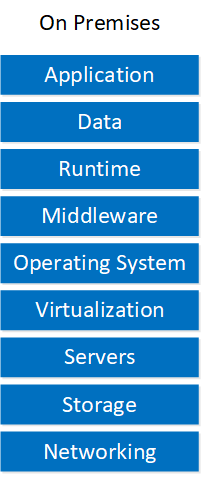
Cloud Service Models On Premises

You maintain the hardware, networking, storage, etc.

Service Models

Let’s look at the different cloud service models and how they relate to the traditional on-premises infrastructure.

Infrastructure as a Service (IaaS)

IaaS offers network infrastructure as a service. Look at this model:
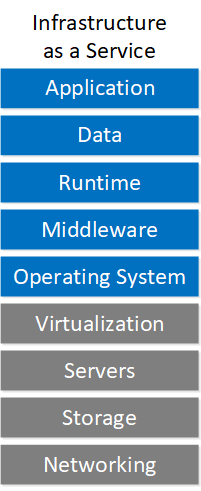
Cloud Service Models Iaas

The cloud provider controls the underlying infrastructure:

  • Virtualization
  • Servers
  • Storage
  • Networking

The customer maintains the upper layers. The customer chooses the operating system, software, application(s), and data.

This service model is popular. You can choose the operating system you want which makes it easy to migrate on-premises servers to the public cloud.

Two examples of IaaS:

  • Amazon AWS EC2
  • Google Compute Engine

Platform as a Service (PaaS)

PaaS is like IaaS but we go three steps further. Check out the following model:
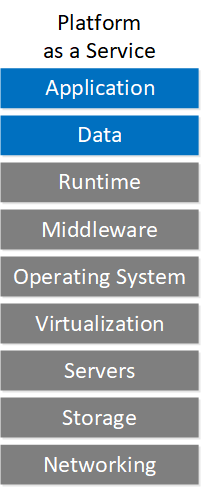
Cloud Service Models Paas

The cloud provider is also responsible for the operating system, middleware, and runtime. The customer maintains the data and application.

This is great for developers who want to run their PHP, Python or Java applications without worrying about the underlying layers. You upload your application and are ready to go.

Two examples of PaaS:

  • Amazon AWS BeanStalk
  • Google App Engine

Software as a Service (SaaS)

In the SaaS service model, the cloud provider maintains and provides everything.. Look at this model:
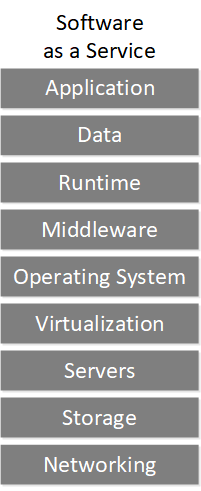
Cloud Service Models Saas

This is the service model most of us are familiar with. Examples are Office 365, Gmail, Facebook, Twitter, etc.

Everything as a Service (XaaS)

The trend nowadays is that we can get everything as a service. Cloud providers come up with new services they offer through the cloud. The X in XaaS is an unknown value, meaning “everything as a service”.

To give you an idea what kind of services there are,  here is a screenshot of Amazon AWS:

amazon aws services

This is a big list of services, there are over 140. Amazon AWS uses cryptic service names so it’s difficult to figure out what the service does by looking at the names.

Here are five XaaS examples:

  • Desktop as a Service
  • Database as a Service
  • Monitoring as a Service
  • IP Telephony as a Service
  • Blockchain as a Service

My favorite is probably AWS ground station where you can get a ground station for satellites “as a service”.

Conclusion

You have now learned the differences between the different cloud service models: IaaS, PaaS, SaaS, and XaaS.

Cloud Deployment Models

According to the definition of the National Institute of Standards and Technology (NIST) there are four cloud deployment models:

  • Public cloud
  • Private cloud
  • Community cloud
  • Hybrid cloud

In this lesson, you will learn about these four cloud deployment models.


Public Cloud

The public cloud is the cloud that most people are familiar with. The cloud infrastructure is available to everyone over the Internet. The cloud service provider (CSP) owns, manages, and operates the public cloud. The infrastructure is at the premises of the CSP.

Public Clouds

You pay for the services, storage, or compute resources you use. Customers that use the public cloud use shared resources. One advantage of the public cloud is that you don’t need to buy and maintain the physical infrastructure. Your connection to the public cloud could be over the Internet or a private WAN connection.

Examples of public cloud providers:

  • Amazon AWS
  • Microsoft Azure
  • Google Cloud
  • IBM cloud
  • Alibaba Cloud

Private Cloud

The private cloud is a cloud model where a single organization uses the cloud.The organization or a third party could own, manage, and operate the cloud. A combination of the two is also possible. This cloud can exist on-premises or off-premises.

Private Cloud On Or Off Premise

Organizations that want more control over their cloud or that are bound by the law often use private clouds.

One difference between traditional virtualization and cloud computing is how we deliver services. Traditional virtualization often uses manual intervention to deliver a service. Cloud computing uses orchestration and automation to deliver a service without manual intervention.

Here are four examples:

  • OpenStack
  • Microsoft Azure Stack
  • VMWare vCloud Suite
  • Amazon AWS Outposts

Public cloud providers can also emulate a private cloud within a public cloud. We call this a virtual private cloud. Amazon AWS and Google Cloud call this Virtual Private Cloud (VPC). Microsoft Azure calls this Virtual Network (Vnet). VPC and Vnet isolate resources with a virtual network unreachable from other customers.

Community Cloud

The community cloud is a private cloud for organizations that share common interests.  For example mission objectives, compliance policies, and security. This cloud can exist on-premises or off-premises.

Community Cloud Options


Because of regulatory standards and the law, the government and public sector often use community clouds. There are cloud providers that offer community clouds, here are some examples:

  • Amazon AWS GovCloud
  • Google Apps for Government
  • Microsoft Cloud for Government
  • Carpathia

Hybrid Cloud

A hybrid cloud is when we combine a private and public cloud. You don’t have a hybrid cloud when you use a separate private and public cloud. We call it a hybrid cloud when the private and public cloud is integrated. An organization might run a Microsoft Exchange server in their private cloud but use Microsoft Azure Active Directory in the public cloud for authentication.

Another example is an organization that runs most of their workloads on their private cloud. When the private cloud is at 100% capacity, they use the public cloud. We call this cloud bursting. The scaling from the private cloud to the public cloud is seamless, you don’t even notice whether you are on the private or public cloud.

Hybrid Cloud Topology

Here are three examples of hybrid clouds:

  • Cisco Hybrid Cloud Platform for Google Cloud
  • IBM Hybrid Cloud Platform
  • Rackspace Hybrid Cloud

Multicloud

This cloud “model” is not in the NIST list of deployment models but good to know since many organizations are interested in multicloud strategies. Some organizations use more than one public cloud provider. It’s easy to get into this. One business unit might use Microsoft technology so they pick Microsoft Azure. Another business unit is into machine learning so they use some Amazon AWS services.

Cloud providers offer different services. One cloud provider might be strong in one area and weak in another.

Inter Cloud Topology

To connect to different public cloud providers you can use an intercloud exchange. The intercloud exchange offers you a connection to one or more public cloud providers. This means you don’t need to use two or more private WAN connections to connect to all your public cloud providers.

Here are three reasons to use multicloud:

  • No vendor lock-in: using the services from a single cloud provider is convenient since everything is in one place. Unfortunately, this decision makes you dependent on the cloud provider so you might want to consider using multiple cloud providers.
  • The best solution for business case: each business unit in your organization selects the cloud provider that matches their needs.
  • Cost: each cloud provider has a different pricing strategy. This can also be a disadvantage since most cloud providers offer volume discounts.
  • Redundancy: there have been major outages. AWS had an S3 outage in 2017 that took down quite some websites and services.

One disadvantage of using multiple cloud providers is that you require IT staff that has knowledge of multiple cloud providers. With the number of services offered, it’s difficult to keep up with everything.

Conclusion

You now learned about the different cloud deployment models:

  • Public cloud
  • Private cloud
  • Community cloud
  • Hybrid cloud

And some common reasons why you might want to use multicloud. I hope you enjoyed this lesson, if you have questions, please leave a comment.

Tuesday, April 14, 2020

VMware vSphere ESXi 7.0 Enterprise Plus

VMware vCenter 7.0 Standard
104HH-D4343-07879-MV08K-2D2H2
410NA-DW28H-H74K1-ZK882-948L4
406DK-FWHEH-075K8-XAC06-0JH08

VMware vSphere ESXi 7.0 Enterprise Plus
JJ2WR-25L9P-H71A8-6J20P-C0K3F
HN2X0-0DH5M-M78Q1-780HH-CN214
JH09A-2YL84-M7EC8-FL0K2-3N2J2


Author: Akide Liu
Link: https://new.llycloud.com/2019/12/18/VMware-vSphere-7-vCenter-7-ESXi-7-Free-Download-With-Test-Key/
Source: Llycloud VCTSC
Copyright is owned by the author. For commercial reprints, please contact the author for authorization. For non-commercial reprints, please indicate the source.

Tuesday, March 31, 2020

Aware Software Infrastructure (VASI) NAT on a Stick


Configuration:
>> CSR1

interface GigabitEthernet1
ip address 192.168.123.1 255.255.255.0
negotiation auto
end

ip route 0.0.0.0 0.0.0.0 192.168.123.3

>> CSR2

interface GigabitEthernet1
ip address 192.168.123.2 255.255.255.0
no ip redirects
negotiation auto
end

ip route 0.0.0.0 0.0.0.0 192.168.123.3

>> CSR3

vrf definition BLUE
address-family ipv4
exit-address-family

interface GigabitEthernet1
ip address 192.168.123.3 255.255.255.0
ip nat inside
ip policy route-map PBR
negotiation auto

interface GigabitEthernet2
ip address 34.34.34.3 255.255.255.0
ip nat outside
negotiation auto

interface vasileft1
ip address 6.6.6.1 255.255.255.0
ip nat outside
no keepalive

interface vasiright1
vrf forwarding BLUE
ip address 6.6.6.2 255.255.255.0
no keepalive

ip nat pool NAT-POOL 10.0.12.0 10.0.12.255 prefix-length 24
ip nat inside source static 192.168.123.2 34.34.34.2 no-alias
ip nat outside source list NAT pool NAT-POOL

ip route 0.0.0.0 0.0.0.0 34.34.34.4
ip route 34.34.34.2 255.255.255.255 192.168.123.2
ip route vrf BLUE 0.0.0.0 0.0.0.0 vasiright1
ip route vrf BLUE 10.0.12.0 255.255.255.0 6.6.6.1
ip route vrf BLUE 34.34.34.2 255.255.255.255 vasiright1 6.6.6.1

ip access-list extended NAT
permit ip 192.168.123.0 0.0.0.255 host 34.34.34.2
ip access-list extended PBR
permit ip 192.168.123.0 0.0.0.255 host 34.34.34.2
permit ip host 192.168.123.2 10.0.12.0 0.0.0.255

route-map PBR permit 10
match ip address PBR
set ip next-hop 6.6.6.2

>> CSR4

interface GigabitEthernet2
ip address 34.34.34.4 255.255.255.0
negotiation auto
end


https://www.cisco.com/c/en/us/support/docs/ip/network-address-translation-nat/200255-Configure-VRF-Aware-Software-Infrastruct.html

Implementing bidirectional source NAT on IOS-XE platform

Introduction


In few scenarios customers wish to implement Source NAT in a bidirectional way. It means they wish to perform Source NAT while going from Interface 1 to Interface 2 and vice versa.

Problem


Current Solution is to achieve the same using NVI feature on IOS and it works perfectly as port overload can be done in both directions. The other alternative is to use traditional nat inside and outside interfaces and configure NAT accordingly. However performing port overload while defining "ip nat outside source xxx"  is not supported.

Now in IOS XE NVI feature is not supported. Hence we are left with only traditional NAT feature but it is not an scalable solution as we can't do port overload. We need to define pool of "n" IP addresses if we want to perform outside to inside source translation for "n" sources.

Solution


This problem can be resolved by using VASI feature available on XE platform. We need to keep interfaces in different vrf. For instance "Interface 1" can be in vrf A and "interface 2" can be in vrf B or any one of them can be in Global Routing table. At end of the day intention is to keep both interfaces in different Routing Domain.

Please find an sample Configuration to achieve the same below :--

Prerequisite:  We need to enable License appxk9 and then only we can create Vasi interfaces.


Topology :--

192.168.1.0/24------Gi0/0/0   (IOS-XE Router)   Gi0/0/2-----10.10.10.0/24

We have binded Gi0/0/0 and vasileft1 in vrf A
Gi0/0/2 and vasiright1 in vrf B
Pool K1 is used to NAT traffic coming from vrf A 192.168.1.0/24
Pool K2 is used to NAT traffic coming from vrf B 10.10.10.0/24
We need Routing in both VRF to point to each other for source subnets. I have used default routes but it can be replaced with routes for post NAT source IP's.


vrf definition A
!
address-family ipv4
exit-address-family
!
vrf definition B
!
address-family ipv4
exit-address-family
!


license boot level appxk9

interface GigabitEthernet0/0/0
vrf forwarding A
ip address 192.168.1.10 255.255.255.0
ip nat inside
negotiation auto
!

interface GigabitEthernet0/0/2
vrf forwarding B
ip address 10.10.10.1 255.255.255.252
ip nat inside
negotiation auto
!

interface vasileft1
vrf forwarding A
ip address 172.16.1.1 255.255.255.0
ip nat outside
no keepalive
!
interface vasiright1
vrf forwarding B
ip address 172.16.2.1 255.255.255.0
ip nat outside
no keepalive
!
!

!
ip nat pool K1 11.11.11.11 11.11.11.11 prefix-length 24
ip nat pool K2 22.22.22.22 22.22.22.22 prefix-length 24
ip nat inside source list 100 pool K1 vrf A overload
ip nat inside source list 101 pool K2 vrf B overload


ip route vrf A 0.0.0.0 0.0.0.0 vasileft1
ip route vrf B 0.0.0.0 0.0.0.0 vasiright1
!
!
access-list 100 permit ip 192.168.1.0 0.0.0.255 10.10.10.0 0.0.0.255
access-list 101 permit ip 10.10.10.0 0.0.0.255 192.168.1.0 0.0.0.255

Wednesday, March 18, 2020

Best Practice for Viptela SD-WAN Controller Sizing

Specs

vBond – If less than 1000 sites, recommend 2 CPU & 4 GB RAM. Else 4 CPU & 8GB RAM. No additional storage needed. Boot disk has all allocated.
vSmart – Recommend going with 8 CPU and 16GB RAM. No additional storage needed. Boot disk has all allocated.
vManage – MUST be 32 CPU and 64GB RAM. Additional storage needed for databases. Recommend 1TB+

Storage recommended to be on SSDs.


See the table below for scaling requirements. Assuming two regions for two set of controllers. Also assuming N+1 redundancy for the controllers.

# of vEdges
# vBonds
# vSmarts
# vManages (Active)
< 2000
2
2
1
<2700
4
2
3
<4000
4
6
3
<6000
6
6
5
<8000
8
8
5
<10000
10
10
7

Maintaining a Simplified CA for SDWAN

Prerequisites

If you’re on a Mac, please ensure you have XCode installed.
If you’re on a Linux machine, please ensure you have the necessary openssl dependencies installed.


Creating the Directories

Create a folder for your CA.
Inside this CA, create the following at command line:

mkdir newcerts private
echo '12345601' >serial    
touch index.txt


OpenSSL CA Configuration File

Copy the openssl.cnf file provided along with this document to the folder for the CA.


Generate the Root CA

Execute this command at the CLI in the folder where you have created the files and placed the openssl.cnf file.

openssl req -new -x509 -extensions v3_ca -keyout private/cakey.pem -out cacert.pem -days 365 -config ./openssl.cnf -subj "/C=US/ST=California/L=San Jose/OU=vIPtela Test/O=vIPtela Inc/emailAddress=aliis@cisco.com" -passout pass:PASSWORD


Signing Certificates

Copy the CSR for the new appliance in to the directory where you have the cacert.pem file generated. Use this command to sign new certificates.

openssl ca -out signed-cert.pem -config ./openssl.cnf -passin pass:PASSWORD -infiles signing-request.csr


Verifying Certificates

In the folder where you have the signed certificate for the CSR generated from the appliance, run the following command to validate that the certificate has been signed.

openssl verify -CAfile ./cacert.pem -verbose signed-cert.pem